
The AI is in the work
Forge is on the call, the text thread, the job and the board, so it knows the customer, the equipment and the history before it acts.
Bring us one week of your real calls and an export from the system you're on now. We'll show you what Forge would have done with them.
Forge is the system for HVAC, plumbing and electrical companies where the AI actually answers, books, dispatches, quotes, invoices and follows up, instead of handing you another dashboard to read. Forge hosts a private AI model for each shop. Your customers, jobs and books stay yours, in a form you can take with you.
You choose what needs your approval. Every action is logged.
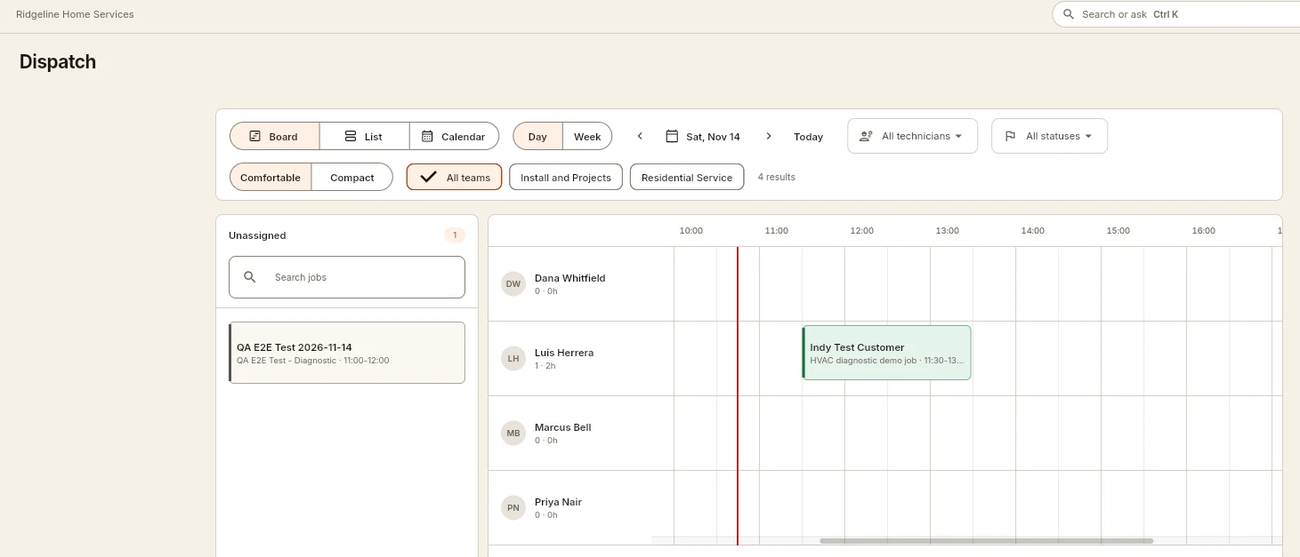
These are screens from the Forge app, shown with demo data. No real customers.

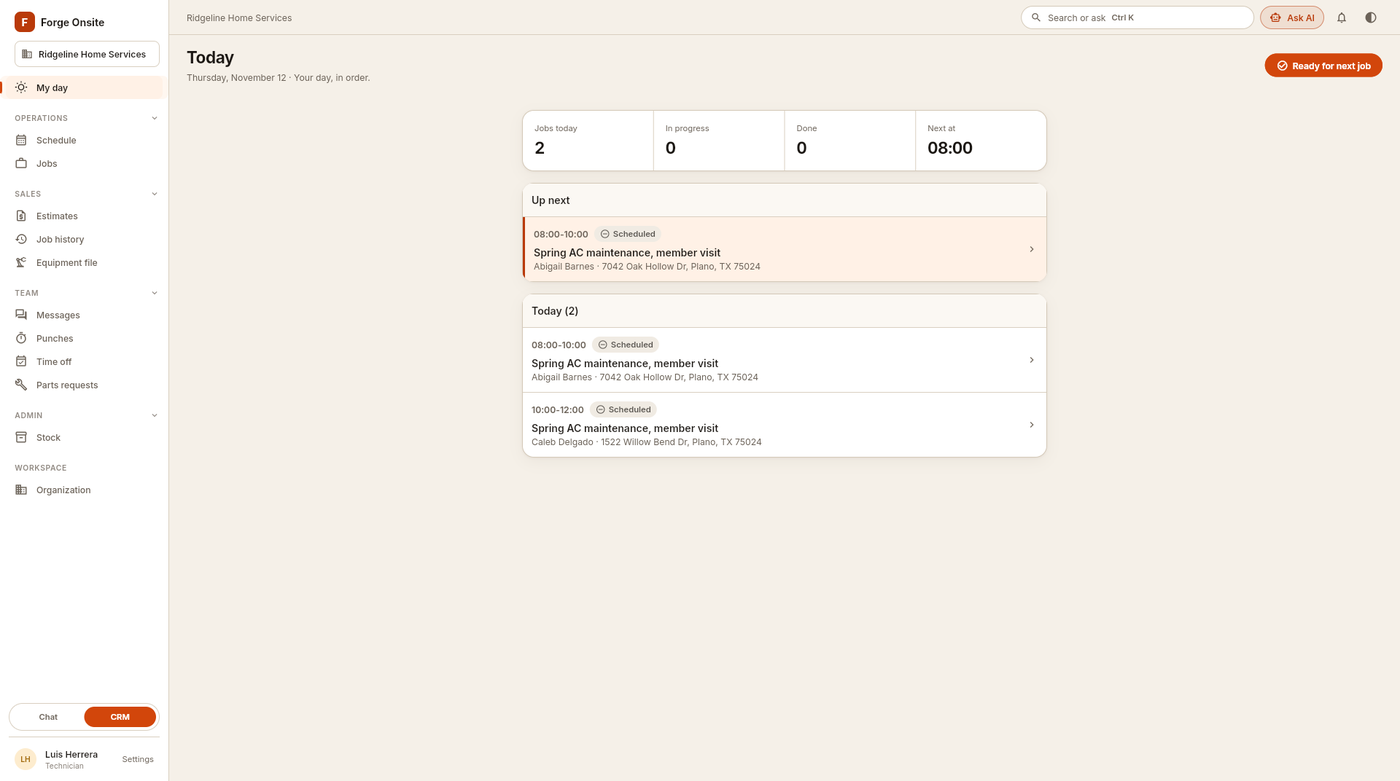
Most shop software shows you what happened and leaves the doing to your office. A lot of AI in shops does the same thing in a new wrapper: it is a search box that answers a question, then waits for you to go do the work. Forge is not that. It is on the call, on the text thread, on the job and on the board, so it has the context to actually do the work. It picks up the call, finds the open window, puts the job on the board, texts the customer, drafts the estimate, sends the invoice, and follows up on the quote nobody answered. You see what it did, and you choose what needs your approval.
“They're just using it as a glorified Google search.”
“The AI is simply not in the meeting. If it's not in the meeting, it's useless.”
An AI that sits off to the side, guessing, is not much use to a shop. Ghodsi points to four things that hold business AI back: context, security, cost and ownership. Here is how Forge answers each one.
Forge is on the call, the text thread, the job and the board, so it knows the customer, the equipment and the history before it acts.
Each shop is walled off from every other shop. Only a question the local AI can't answer goes to an outside AI, with names removed first, and every trip is logged.
Not per tech, not per click. Everything in your tier is included, with no add-on fees, and you can cap AI usage or turn it off.
Your customers, jobs, calls and books stay yours. An admin can export them any time, as files you can open anywhere.
Forge Onsite is not affiliated with Databricks or Ali Ghodsi. The quotes are from his public remarks on the All-In podcast.
Two things we are working on that put the phone call and the job at the center.
When a customer calls to book, Forge listens, then writes a plain job summary from the call and puts it on the job. The tech opens the job and already knows what the customer said, with the call summary saved to the customer record.
Office and techs talk about a job in the chat attached to that job, with photos, so the conversation stays with the work instead of getting lost in a separate chat app.
Here is what Forge does with that call, and what comes after it. The AI does the work. Your team does the jobs.
Forge answers with a recording notice, takes the details, and saves a call summary to the customer record. A repeat caller reuses the same record, and a gas smell goes straight to your on-call person.
The booking form shows only open arrival windows that a qualified tech can cover, and Forge picks the earliest one. The customer gets a confirmation text with the date, arrival window and tech. The AI also writes a job summary from the call and puts it on the job.
One page, waiting for the owner: calls answered overnight, jobs booked, and anything that needs a decision.
He opens the job on his phone. The customer's history and equipment are on the job, and he can ask Forge by voice or text from the truck. Take a photo of a nameplate and Forge reads it.
Good, better and best options are created from the job and kept on the job's site, with an estimate PDF the office sends by text or email.
The invoice is built from the job's lines, with parts from the truck's stock already on it, then sent by text or email. Payments are recorded, and QuickBooks stays in sync.
Unsold estimates sit in a queue with the site shown on each row, so the quote nobody answered gets followed up.
Someone picks up.
This is a small example of what Forge does. Every feature is listed on the features page.
Customers and sites, the dispatch board, estimates and invoices, memberships, purchase orders and bills, QuickBooks export and sync, reports, an owner morning summary, and a phone app for the techs, all in one place, in English and Spanish. Bring your history over from the system you're on now, with a preview and an undo. The AI phone line answers the call, and texts stay on the customer record. Techs ask Forge by voice from the truck: customer history, equipment, parts, warranty, and what to say on the call. Take a photo of a nameplate and Forge reads it. The shop playbook sits on the tech's phone.
A lot of platforms charge extra for phones, texting, marketing, the price book, reporting and accounting sync. Forge is a whole-package solution: everything in your tier is included, with no add-on fees and no surprise modules.
One way to set it up. Each agent owns a slice of the work and acts on it inside the rules you set. When something falls outside those rules, it goes to a person.
Writes the one-page morning summary for the owner and keeps the audit log of who or what changed what.
Answers calls, keeps texts on the customer record, books jobs, and creates customers and jobs.
Picks the earliest window a qualified tech can cover and the best tech for it, and holds unclear matches for review.
Drafts estimates, works the follow-up queue on unsold estimates, and runs campaigns.
Drafts invoices, tracks bills and purchase orders, and keeps QuickBooks in sync. Techs never see money pages.
Takes the calls and questions the AI hands off, and keeps an eye on the log.
Sets the rules, reads the morning summary, and makes the money decisions.
The most valuable thing a shop has built is not a contact list. It is the jobs, the calls, the equipment, the memberships and the books — the work itself.
That work sits in your own walled-off account, and you can export it whenever you want, as files you can open anywhere.
Forge hosts a private AI model for each shop, and your customer data stays in-house.
Photos are read only by Forge's own server.
Only a question the local AI can't answer goes to an outside AI, with names, addresses, phones and emails removed first. When a phone call is turned into text, or when a question needs a web search, that request goes out with the same names-removed step. Every trip is logged.
Giving an AI access to a shop is a real responsibility. You decide what the AI can see and do, and you can cap usage or turn the AI off.
Each shop is walled off from every other shop, and every action is logged with who or what did it.
The AI can do routine work on its own, inside the rules you set for your shop, such as creating a customer from a call or applying a tag a tech uses. The last mile stays with a person: anything you put behind approval stays a draft until you confirm it, and anything outside your rules goes to your team.
It starts with your real work, not a sales deck.

Bring your history over from the system you're on now, with a preview, a confirmation step and an undo. Customers, sites, jobs, invoices and photos come across with an audit trail of what was imported.

You choose what needs your approval. What can the AI book on its own? Who can quote a price? When does a call go to a person? We write it down with your team, and the AI follows it.

Your office, dispatchers and techs learn the system, and the AI starts doing the work: the phone, the board, the estimates, the invoices and the follow-ups.
You don't start from zero. We bring your history over from the system you're on now.
Forge runs from $3,000 to $7,000 a month, depending on the size of your shop. No per-user fees. The price is meant to replace office labor, not just another software bill.
$3,000/month
For shops with up to about 6 trucks.
$5,000/month
For shops with about 7 to 15 trucks.
up to $7,000/month
For shops with 16 or more trucks, or more than one location.
A lot of shop software advertises a low base price, then charges extra for phones, texting, marketing, the price book, reporting and accounting sync. Forge is a whole-package solution. Everything in your tier is included: no add-on fees, no per-user fees and no surprise modules.
See what every plan includes · Prefer email? hello@forgeonsite.com · or call (904) 643-6896
Yes, inside the rules you set for your shop. It answers the phone, books the job, creates a customer from a call and applies the tags a tech uses. You choose what needs your approval. Anything you put behind approval stays a draft until you confirm it, and anything outside your rules goes to your team.
Plans are a 1-year contract. The setup fee is case by case, so we quote it for your shop. Voice minutes are set per company and quoted the same way.
No. A lot of software companies advertise a low base price, then charge extra for phones, texting, marketing, the price book, reporting and accounting sync. Forge is a whole-package solution. Everything in your tier is included: no add-on fees, no per-user fees and no surprise modules. Extra voice minutes are included in the Multi-location tier; they are part of that package, not an add-on.
Core is $3,000 a month, Full shop is $5,000 a month, and Multi-location is up to $7,000 a month, depending on the size of your shop. There are no per-user fees. The price is meant to replace office labor, not just add another software bill. The AI phone line and texting are in every tier, starting with Core. Plans are a 1-year contract. See the pricing page for what each tier includes.
Forge hosts a private AI model for each shop, and each shop's data is walled off from every other shop. Your customer data stays in-house. Photos are read only by Forge's own server. Only a question the local AI can't answer goes to an outside AI, with names, addresses, phones and emails removed first. When a phone call is turned into text, or when a question needs a web search, that request goes out with the same names-removed step. Every trip is logged. See the Security page.
Yes. You bring your history over from the system you're on now: customers, sites, jobs, invoices and photos, with a preview, a confirmation step, an undo, and an audit trail of what was imported. Saved payment cards can't be moved from one payment processor to another, for security reasons, so those cards get collected again from customers.
You decide what the AI can see and do. Techs never see money pages; managers and admins see the office. Every action is logged with who or what did it, and you can cap AI usage or turn the AI off.
Your data is yours. An admin can export it any time, including a QuickBooks-layout CSV or Excel file of bills, invoices, payments and vendors, as files you can open anywhere.
Forge is hosted, so the app needs a connection. When a tech has no signal, clock punches queue and sync later.
No. A gas smell goes straight to your on-call person, and the last mile stays with a person.
The AI phone line answers with a recording notice and saves a call summary to the customer record.
Or write hello@forgeonsite.com